How do I set data limits on access keys?
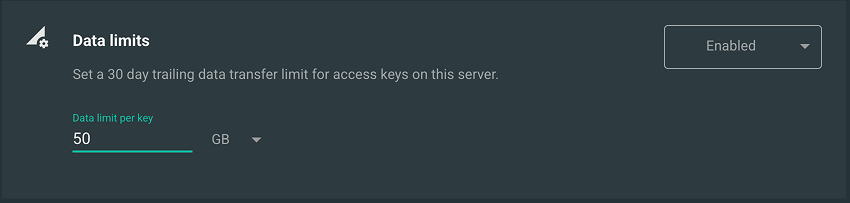
You can set a data limit that will apply to all access keys. To set the limit, open Outline Manager and navigate to Settings. There you will see a Data limits toggle that, when enabled, lets you set a limit.
Once you set a limit, you can see how close each user is to the limit on the access key page, where a bar graph shows the data usage over the last 30 days.
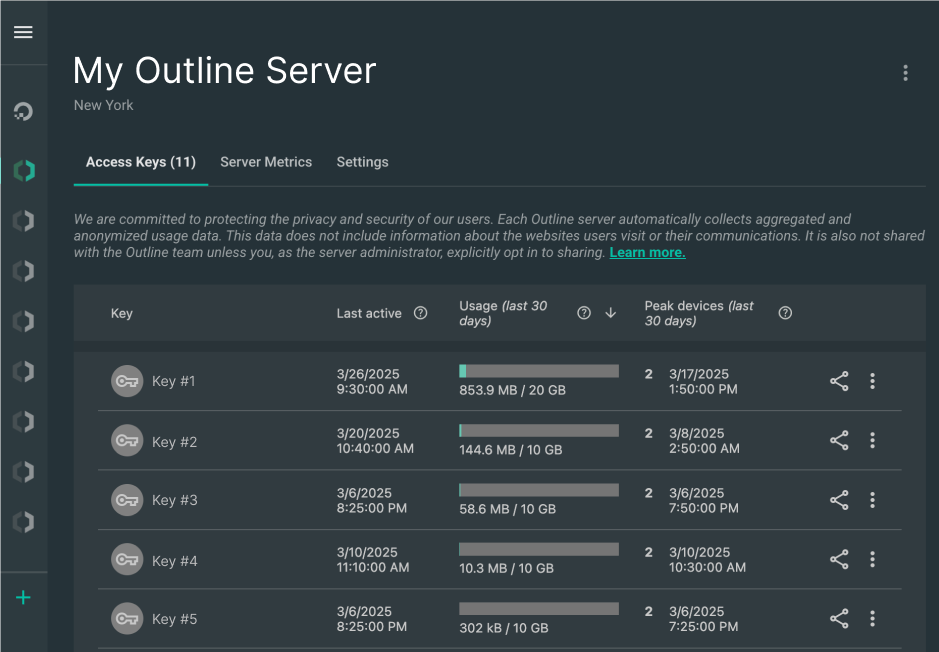
In addition to being able to set a limit for all of your access keys, you can grant each key its own data limit. This setting will override any default data limit that you have set, but if you have not set a default data limit, you can still set a data limit for any key.
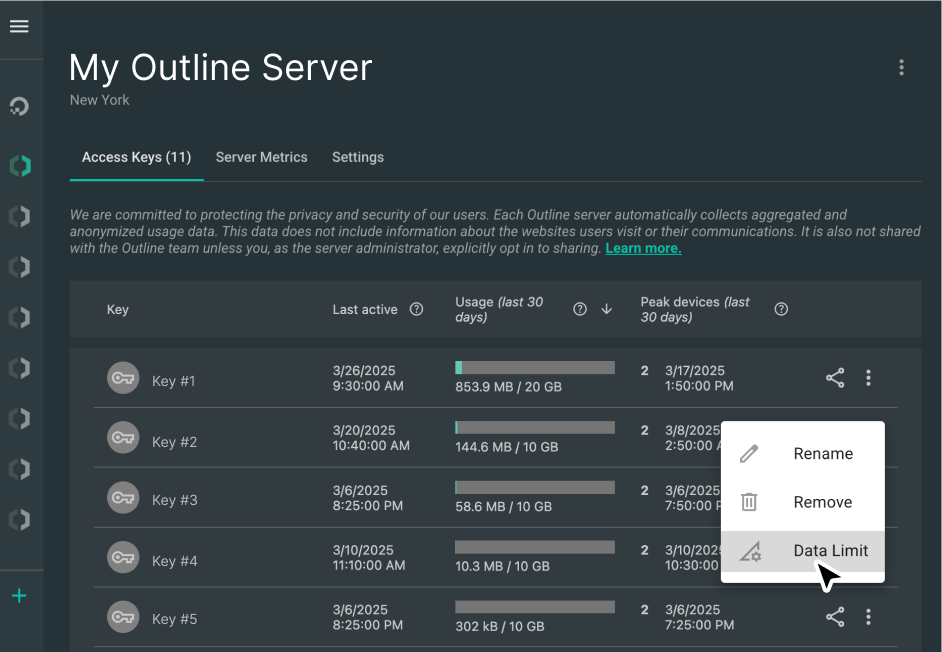
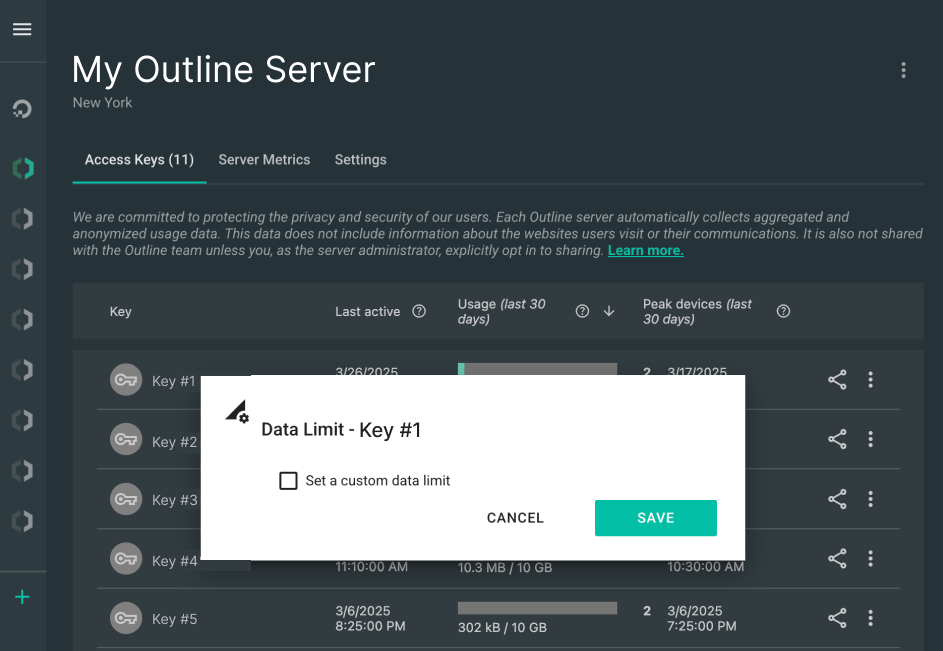
To set a key's data transfer limit, open the Outline Manager, navigate to the Connections tab that contains the key that you want to set and click on the menu on the right side of the key's row. From there, click on Data limit. To change the data limit on 'My access key', click the data limits icon  .
.
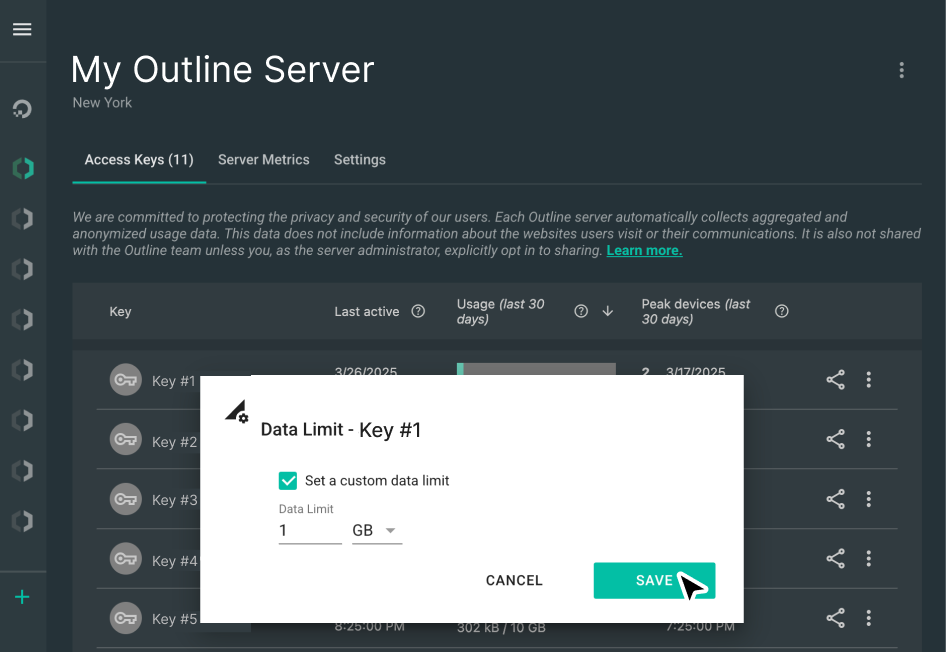
Select Set a custom data limit. Once you've selected this tick box, a field will appear where you can set the custom data limit for that key. Click on the SAVE button when you're done to save the data limit.
Once you've saved your data transfer limit for the chosen key, the limit will show on the main screen, alongside the data usage (over the past 30 days) for each key.
To remove the data limit from an access key, navigate to the key's Data limit dialogue as before, untick the box labelled Set a custom data limit and click the SAVE button.
Data limit FAQ
What is a 30-day trailing data limit?
A 30-day trailing data limit will sum each key's usage over the past 30 days and keep the key's usage over that period below the limit. The effect is that the key cannot go over the limit during any 30-day period, including calendar months of 30 days or fewer In effect, this means that each user's available data will increase each day by the amount that they used 31 days ago.
Why does Outline use trailing limits?
Trailing limits provide guarantees over every 30-day period, which means that they're simpler to configure than a recurring limit (such as a customisable day of the month) while providing similar guarantees. They also match the existing display for Outline data use, as well as common tools such as analytics services and server statistics.
What data is counted in a data limit?
Each access key's egress from the server is included in the tally. Strictly speaking, this means data sent on the key's behalf out of the server, as well as back to the client. Practically, this should closely align to the traffic sent from the key to the server and back, so we hope it will match your users’ tallies. We chose egress since that is what the cloud providers that we surveyed bill for.
Will users be notified if they've run over their data limit?
Not at the moment. Many cloud providers include a limit such as 1 TB for the whole month, which can support 10 users at 100 GB or 100 users at 10 GB. These are pretty big numbers, and we don’t expect many users will hit them. We hope that users will contact server managers when they hit their limit. However, we'd appreciate your insight into how notifications might help for your use case, and you can contact us here.
Will users be notified if they approach their data limit?
The amount of new data that a user approaching their limit will receive will vary from day to day because it's based on their use 30 days ago. We think that a warning is more likely to confuse end users than to help them. We'd appreciate your feedback on this behaviour here.
Can I reset a user's data usage?
No, a user's limit always includes the past 30 days of data use. However, you can raise their key's data limit or create a new key for them.
Why did some of my users lose access as soon as I enabled data limits?
Data limits are based on users' prior 30 days of data transfer, which is recorded whether or not data limits have been enabled. It's possible that the users in question had already exceeded the limit before it was put in place. Also note that all data limits are enforced, even when changing a single key's data limit.
Can I set a server-wide limit, such as '1 TB per 30 days'?
Not at the moment. We'd love to hear more about your use case here.
If there's a default data limit and a data limit on a specific key, which one will be enforced?
The specific key's data limit will override whatever default data limit (if any) you have set.
Can I set a data limit for a specific key without having a default data limit set?
Yes. You don't need a default limit defined in order to set a data limit on one key. For example, you could set a limit on one key which you think may be shared broadly in order to protect yourself from excessive data transfer through that key.